Plan and track anything
in plain Markdown.
Standard Markdown you can open anywhere, with all planning tools built in. Streams, calendar, maps, routes, tasks and habit-tracking — native, connected, and entirely yours.
Windows is the primary, fully tested build. A Linux AppImage is also available.
Private by design · your files never leave your device
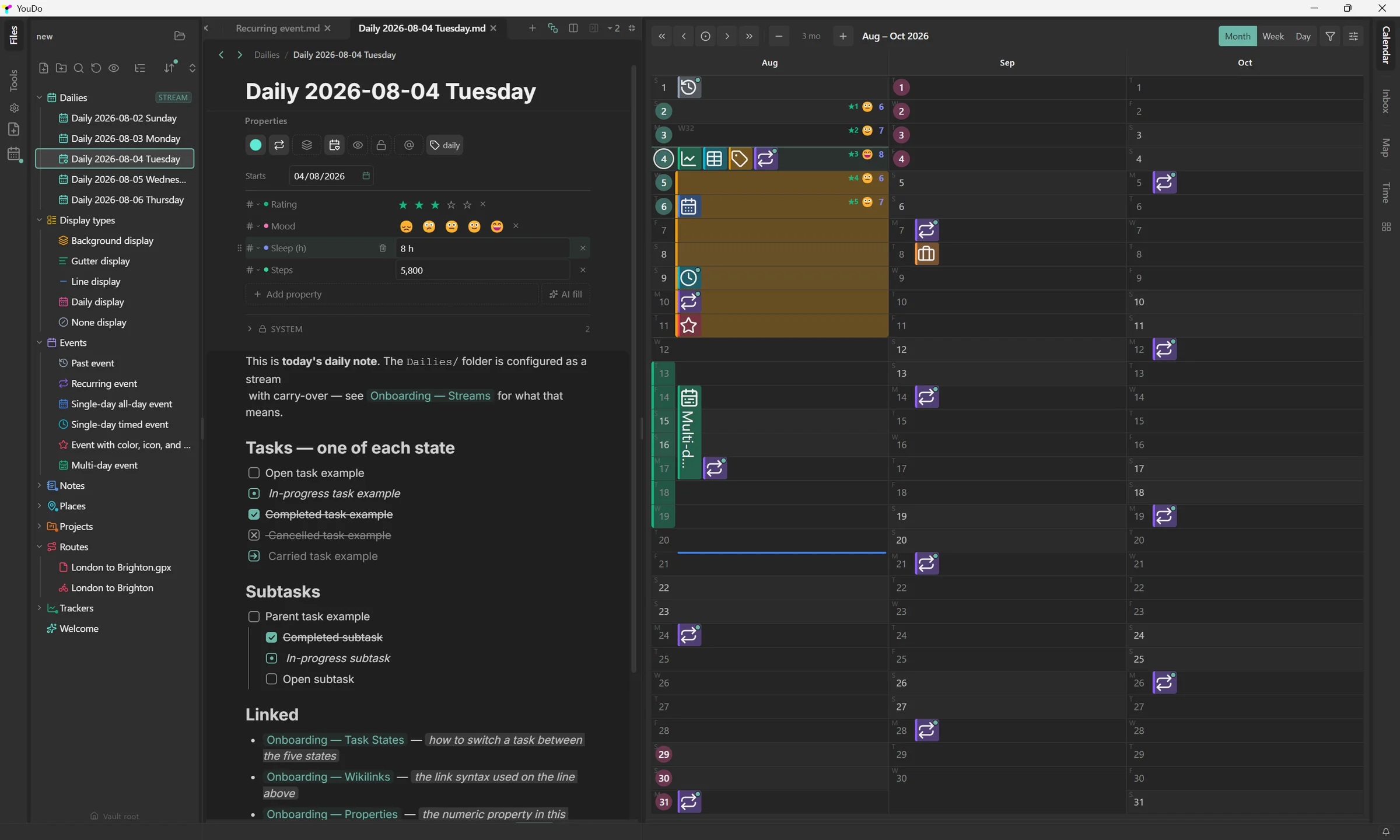
More than a text editor
What, when, where — in one file
YouDo starts from plain Markdown files, then adds the planning tools other apps make you assemble yourself, and makes them work together.
What
The note itself — and everything you can put in it.
Plain-Markdown editor
A rich, block-based editor over ordinary .md files. What you see is exactly what is saved to disk. No database, no proprietary format.
Tasks
Checkable tasks you can drag to reorder and reprioritise, carry forward, and schedule, right inside any note.
Properties
Typed properties on any note: dates, numbers, tags, checkboxes, locations. Stored as standard YAML frontmatter, the same open format the Markdown ecosystem uses.
Cascading folders
Set properties once on a folder and they cascade to every note inside. Children can override with their own value, or you can force one down the whole tree, then bake it into each file when you want it permanent.
Wikilinks & backlinks
Connect notes with [[wikilinks]] and aliases; see every backlink surface automatically.
When
Every note lands on a day, and every day adds up.
Streams
Recurring daily and periodic notes that carry unfinished tasks and properties forward automatically. Your journal, planner and log, always current.
Calendar
A real calendar for your notes and events — month, week and day, timezone-correct, with reminders.
Tracking
Track numbers and habits over time and see them on your days. Built for long-term planning, not just today.
Photos on your calendar
Your photos appear as thumbnails on the day they were taken, turning the calendar into a visual timeline of your year.
Where
Notes have a place, and places join up into trips.
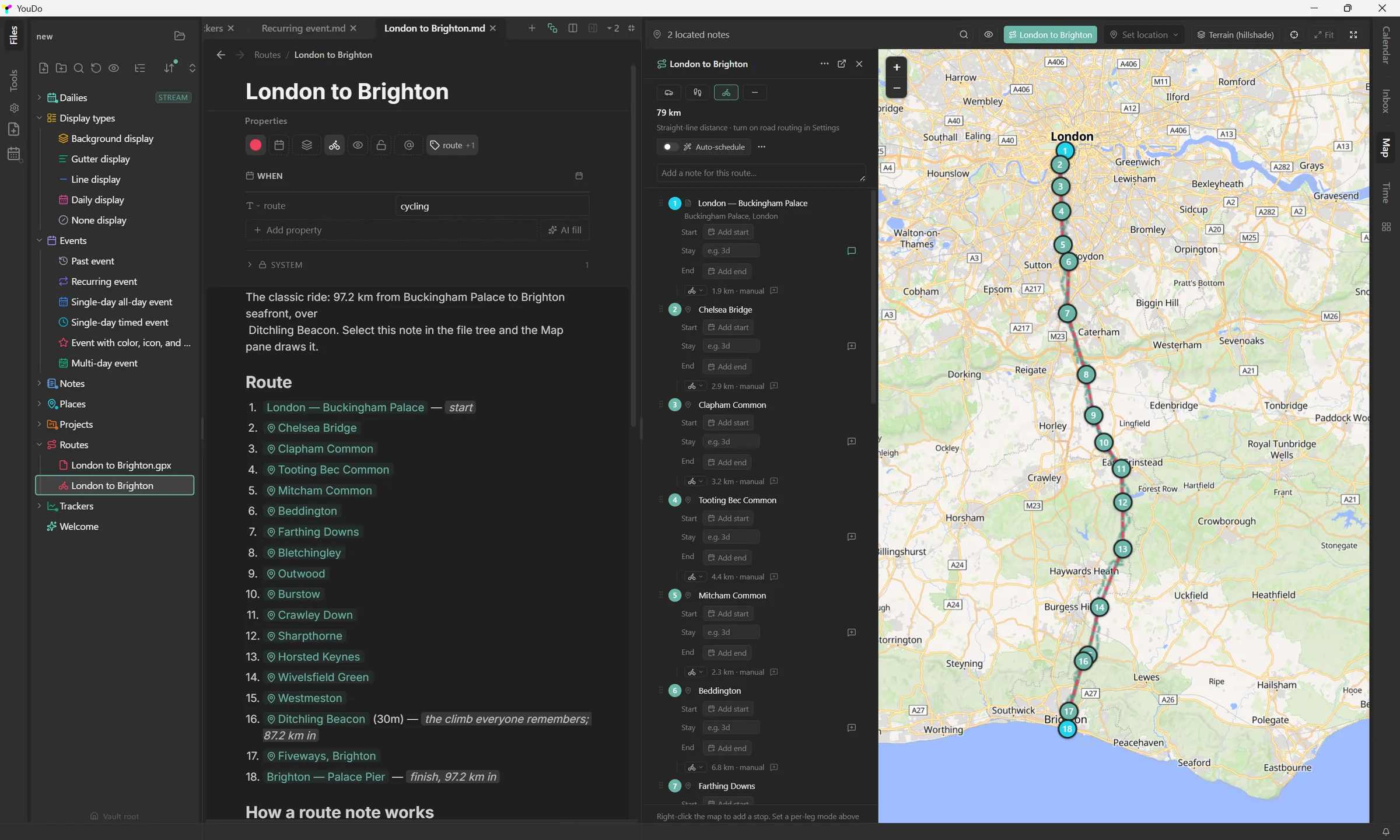
Maps & locations
Pin notes and places on an interactive map; geotagged photos cluster by location, so your travels map themselves.
Route planning
Chain places into a multi-stop route and plan it on the map. Say how long you're staying and the dates cascade; lock what's already booked and the plan works around it.
GPS files, read in place
Open a .gpx, .kml or .tcx and see what is in it drawn straight on the map. Turn it into an activity or a route note only when you want to — the original file is never rewritten.
Optional, every one of them
Connect what you want. Nothing else.
YouDo works fully offline. Each of these is opt-in, off by default, and can be switched off again on its own.
Your key, your account
Sign in or bring an API key.
Claude AI
Writing help, grammar and polish, property auto-fill — under your own Anthropic key.
Google Calendar
Two-way sync between the calendars you choose and the folders you bind them to.
Strava
Import runs, rides and hikes straight from your account. Read-only.
MapTiler
Topographic base maps with contours and hillshade.
Geoapify
Faster place lookup and door-to-door transit routing.
No account needed
Just an internet connection.
Weather
Forecast and past weather on your days, from Open-Meteo.
Location & address lookup
Turn an address into coordinates, or find where you are. OpenStreetMap.
Road routing
Snaps route legs to real roads and paths — drive, walk or cycle. Valhalla, hosted by FOSSGIS.
One master switch governs all of them. Turn Online access off and YouDo makes no network connection at all — not even to check a key.
Reclaim your data.
Private. Local-first. Yours.
There's no proprietary YouDo format to get trapped in. Everything is plain Markdown with YAML frontmatter, the same open standard that Obsidian, VS Code and the rest of the Markdown world already read. Open your folder anywhere, or take it all and walk.
Plain Markdown files
Notes are ordinary .md files (CommonMark). Open the same folder in VS Code, Obsidian, or any editor, even edit side-by-side.
YAML frontmatter properties
Metadata is standard YAML frontmatter, the same open format the Markdown ecosystem uses, so your properties travel with the file.
Calendars as .ics
Two-way sync and export via standard .ics (Google Calendar, Apple Calendar or Outlook), so your schedule isn't stuck inside the app.
Photos stay photos
Images are ordinary JPG/PNG files with their EXIF intact: geotags, capture dates and camera data all preserved.
Routes as lists, tracks as GPX
A planned route is a numbered list in the note, and places are RFC 5870 geo: links that open in your OS map app. Your .gpx, .kml and .tcx files are read where they sit and never rewritten.
No account, no cloud requirement, no export ransom. If YouDo ever isn't for you, your notes are already in formats every other tool can read.
Download YouDo
Free during the public beta, no license key required.
Windows is the primary, fully tested build. A Linux AppImage is also available.
Platforms & requirements
- Windows 10 / 11 (64-bit) — primary, fully tested build
- Linux — AppImage (64-bit), newer and still experimental
- ~250 MB free disk space
- Works fully offline; no account required
First launch
Builds aren't code-signed yet, so on Windows SmartScreen may warn about an “unknown publisher” — click More info → Run anyway. On Linux, make the download executable ( chmod +x YouDo-*.AppImage ) and run it. Signing is on the roadmap.